GPTBot IP Ranges and How to Verify an AI Crawler
Every AI operator publishes crawler IP ranges so you can check them. Here is where the files are, how to use them, and why a proxy passes every one.

The short version
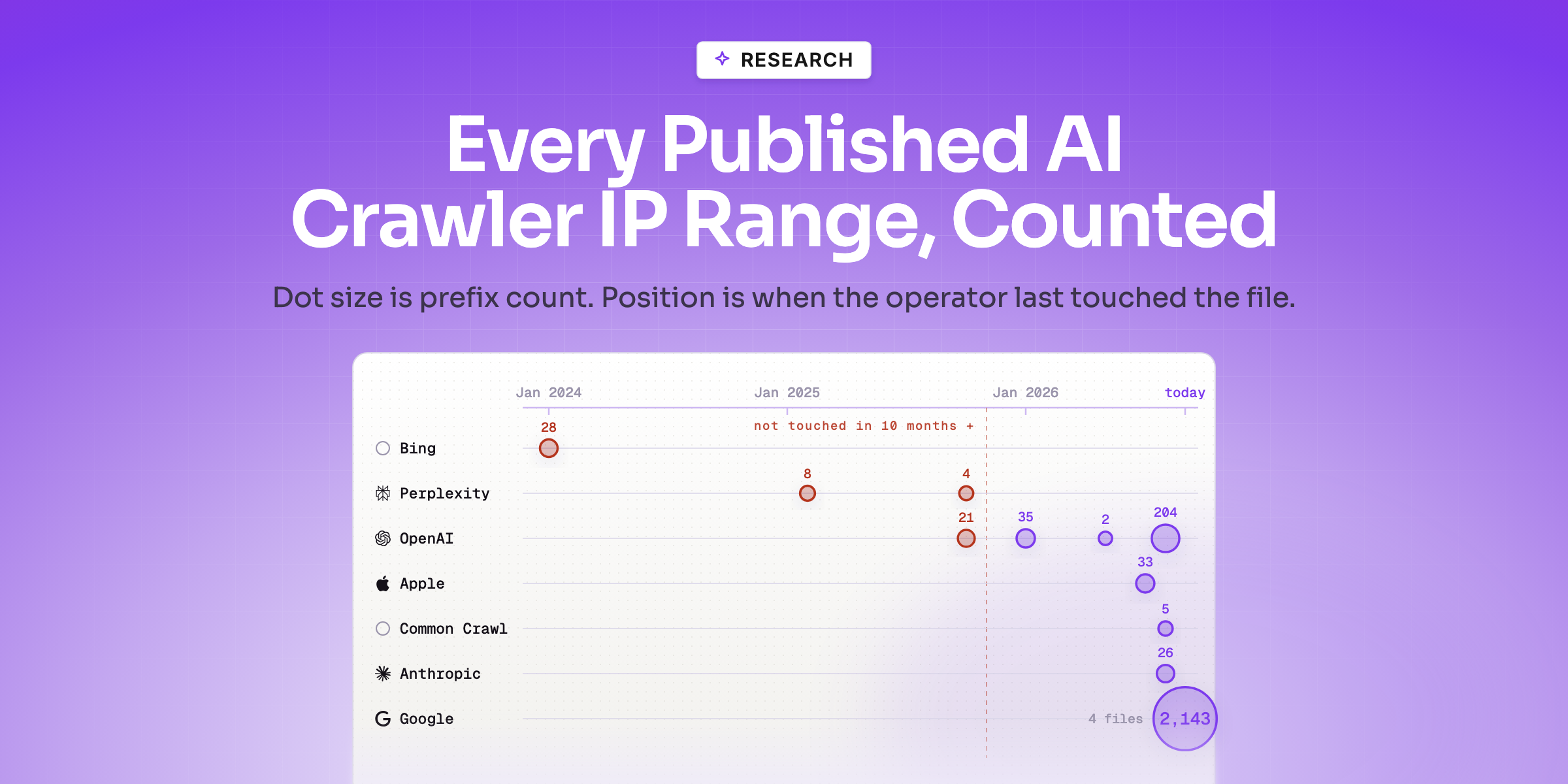
Every major AI operator publishes the IP ranges its crawlers use, so you can check that a bot is what it says. We fetched all fourteen files and counted them: 2,509 prefixes, 89,490 IPv4 addresses, and four things the documentation does not tell you — the live fetchers occupy ten times the address space of the training crawlers, several operators have not updated their file in over a year, five of seven publish no IPv6 at all, and Perplexity's entire published surface is 32 addresses. Run the check anyway. Then know its ceiling: a request routed through a residential proxy never claims to be a crawler, so there is no range to test it against. The signal that survives is whether the page actually rendered.
Key highlights
- 1 Fourteen published files, 2,509 prefixes, 89,490 IPv4 addresses in total
- 2 ChatGPT-User runs on ten times the address space GPTBot does
- 3 Bing's file has not changed since January 2024; Google's changes daily
- 4 Five of seven operators publish no IPv6 ranges at all
- 5 OpenAI publishes one file per agent, so a single list will miss three of its four
- 6 A residential proxy passes every IP check you own, by never claiming a bot name
- 7 Only whether the page rendered separates a person from a crawler
- 8 A signal that did not exist yet is not evidence of guilt
- 9 Round numbers and office-hours bursts mean the traffic is you
- 10 Googlebot does render, so "AI crawlers never run JavaScript" is not a rule
You have a log full of names, you have worked out which bot is which, and now you want to know whether the names are true.
They are not identities. A user agent is a free-text header the client writes about itself, and nothing checks it. Common Crawl says so in its own documentation — it is, in its words, "aware of crawlers falsely identifying themselves as CCBot." Every operator on the list knows the same thing, which is why they all publish address ranges you can check against.
This is the piece about doing that check properly, and about what it still cannot tell you.
We Fetched All Fourteen Published Range Files and Counted Them
The check is mechanical: take the requesting IP from your log, and test whether it falls inside a range the operator publishes for the agent that request claimed to be. If it does not, the name is a claim and nothing more.
So we fetched every file. All fourteen, on 3 September 2026, and counted what is actually in them. These are the operators' own public files; the counts below are ours.
| File | Prefixes | IPv4 | IPv6 | IPv4 addresses | File last changed |
|---|---|---|---|---|---|
openai.com/gptbot.json | 21 | 21 | 0 | 3,472 | 30 Oct 2025 |
openai.com/searchbot.json | 35 | 35 | 0 | 2,496 | 2 Jan 2026 |
openai.com/chatgpt-user.json | 204 | 204 | 0 | 36,016 | 14 Aug 2026 |
openai.com/adsbot.json | 2 | 2 | 0 | 256 | 12 May 2026 |
claude.com/crawling/bots.json | 26 | 26 | 0 | 1,094 | 18 Aug 2026 |
perplexity.com/perplexitybot.json | 8 | 8 | 0 | 18 | 7 Feb 2025 |
perplexity.com/perplexity-user.json | 4 | 4 | 0 | 14 | 17 Oct 2025 |
index.commoncrawl.org/ccbot.json | 5 | 4 | 1 | 28 | 11 Aug 2026 |
Google googlebot.json | 317 | 170 | 147 | 5,088 | 2 Sep 2026 |
Google special-crawlers.json | 272 | 136 | 136 | 4,352 | 2 Sep 2026 |
Google user-triggered-fetchers.json | 1,058 | 529 | 529 | 16,928 | 2 Sep 2026 |
Google user-triggered-fetchers-google.json | 496 | 248 | 248 | 7,936 | 2 Sep 2026 |
search.developer.apple.com/applebot.json | 33 | 33 | 0 | 7,056 | 31 Jul 2026 |
bing.com/toolbox/bingbot.json | 28 | 28 | 0 | 4,736 | 3 Jan 2024 |
2,509 prefixes. 89,490 IPv4 addresses. That is the entire documented address surface of the crawlers people are trying to verify. Google's two user-triggered files may overlap, so treat the total as an upper bound rather than a sum of distinct addresses.
Four things fall straight out of that table, and none of them are in the documentation.
The live fetchers are the biggest surface, not the training crawlers.
ChatGPT-Userruns on 204 prefixes and 36,016 addresses.GPTBotruns on 21 and 3,472. The agent that fires because a person asked a question occupies roughly ten times the address space of the one collecting training data, and the same inversion holds at Google:user-triggered-fetchersis 1,058 prefixes againstgooglebot.json's 317. If you sized your verification effort by which name you have heard of, you sized it backwards. The three-way split between training, index and live is worth reading first.The stale file is usually the operator's, not yours. The standard advice is to re-fetch rather than cache, and it is correct. But
gptbot.jsonhad not changed in over ten months when we pulled it,perplexitybot.jsonnot in nineteen, andbingbot.jsonnot since January 2024 — twenty months. Google restamps all four of its files daily; ours were timestamped the previous afternoon. Re-fetching a file the operator has not touched since 2024 gets you a fresh copy of a stale answer.Five of the seven operators publish no IPv6 at all. Google publishes IPv6 in every file, and Common Crawl has a single prefix. OpenAI, Anthropic, Perplexity, Apple and Bing publish zero. If a request reaches you over IPv6 — increasingly the default on mobile networks — there is nothing to check it against, and a verification script that treats "not in the file" as "not the operator" will mark legitimate crawlers as fake.
Perplexity's entire published surface is 32 addresses. Eight prefixes for
PerplexityBot, four forPerplexity-User, 18 and 14 addresses respectively. Either Perplexity crawls from a genuinely tiny pool, or the published file does not describe the whole of it. Both readings matter for what a failed check means.
How to Actually Use the Files
Four practical notes before you build anything on them.
OpenAI's split is the one that catches people out. There is no single OpenAI file. A script that fetches
gptbot.jsonand calls the job done will markOAI-SearchBot,ChatGPT-UserandOAI-AdsBotas unverified, and those are three quarters of OpenAI's presence in your log. Which agent is which is worth getting straight first.Re-fetch, but read the timestamp. Each file carries one, and a copy you saved months ago will start failing legitimate traffic — a verification script running off a stale cache produces exactly the wrong error, telling you a real crawler is fake. The counts above add the other half of that rule: check the operator's date too, because on several of these files it has not moved in over a year, and a fresh download of a stale file is still a stale answer.
Treat "not in the file" as unverified, not as fake. Given the IPv6 gap and Perplexity's 32 published addresses, a failed check has at least three explanations — a forged name, a range the operator has not published, and a protocol the operator does not cover. Only one of them is the bot lying.
Verification is not blocking. Anthropic's own documentation is blunt that IP blocking "may not work correctly or persistently guarantee an opt-out." The lists are for reading your log, not for building a wall out of.
Done properly, this promotes a name in your log from a claim to evidence. It is worth doing. It is also where most people stop, and stopping there is what this piece is about.
The Request an IP Check Cannot See
Address verification has a specific ceiling, and it is worth stating exactly.
The check works by comparison: this request said it was GPTBot, GPTBot's addresses are published, does this address appear in the file. Everything about it depends on the request having made a claim you can test.
A request that never claims to be a crawler has nothing to test against.
That is not a hypothetical. Requests routed through a residential proxy arrive from ordinary consumer broadband addresses, carrying ordinary browser user agents. There is no vendor range file for "somebody's home connection", because it is not a vendor. Every field on such a request is genuine, and none of it is about the party that actually wanted the page:
- The address really is that ISP's, assigned to a real subscriber.
- The user agent really is a browser string, and often a current one.
- The referrer and language headers are whatever the proxy's client set, which can be anything plausible.
- What is missing is any claim you are entitled to test.
So the two checks you can run on a request in isolation cover less than they appear to:
| Check | Catches | Blind to |
|---|---|---|
| User agent is on a known bot list | honest crawlers, which is most of them | anything presenting as a browser |
| IP falls inside the vendor's published range | a forged crawler name | anything that never claimed a crawler name |
Both are worth running, and together they will resolve the large majority of a normal log — most crawlers identify themselves honestly, because their operators want the traffic attributed. But the residue they cannot classify is precisely the traffic you would most want explained, and no amount of care with the range files reaches it.
The distinction to hold: address verification answers is this request from the operator it claims. It does not answer was a person here, and the second question is the one your analytics is reporting on.
Why the User Agent and the IP are Both Costumes
It helps to be precise about what each field actually is, because they fail in different ways.
- The user agent is a claim the client makes about itself. Nothing in HTTP verifies it. Writing
GPTBotinto a header costs one line of code, and Common Crawl's own documentation says it sees exactly that happening. - The IP address is a fact about the previous hop — which is not the same as a fact about the requester. Behind a proxy the previous hop is somebody's home broadband, and it is entirely genuine.
The second is the trap, because an address feels like hard evidence in a way a self-reported header does not. It is hard evidence, of the wrong thing. Residential proxy networks are cheap, widely sold and exist specifically to make that last hop look like a consumer.
There is a third field people reach for, and it is worth ruling out explicitly. Request rate — a burst of pages in a few seconds — reads like a bot and often is one. But it is trivially spread out by anything that wants to avoid it, and a genuinely fast reader with prefetching on will trip it. Rate is a hint, not a check.
None of these three is looking at the thing that actually separates a person from a program.
The Only Check That Survives: Did the Page Render?
A crawler fetches your HTML. A browser fetches your HTML and then runs it.
That difference is measurable, and it is currently the sharpest line available. AI crawlers download JavaScript and do not execute it. An analysis of over 500 million GPTBot fetches found no JavaScript execution at all — GPTBot downloads JS roughly 11.5% of the time and never runs it, ClaudeBot roughly 23.8% and never runs it. Those figures are that study's, not ours, and they are worth reading in the original before you build on them.
So the check inverts. Instead of asking the request to prove itself, you let the page ask:
- The server writes a row when the request arrives — every request, including ones served from cache.
- A small script in the page body sends a second, separate signal only if the page actually rendered in a browser.
- The second signal marks the row that already exists. It never creates one, because a browser does not fetch the page twice.
A crawler simply leaves its row unmarked. The silence is the finding. You are not asking a bot to confess; you are noticing that it never did the one thing a browser cannot avoid doing.
Applied to the proxy case above, this is the check that does not go blind. The user agent says browser and the address says consumer broadband — both genuine, both useless — and the render signal simply never arrives.
One honest caveat about the mechanism. The render signal runs in the visitor's own browser, so it cannot carry a secret key; the usual gate is the request origin, which is forgeable. But the only thing a forger gains is the claim that a browser rendered a page it had already fetched, while the timing and location columns still disagree with that story. It raises the cost of the lie rather than eliminating it, which is the usual shape of this kind of check.

Three States, Not Two
The most tempting mistake with a render check is to treat every unmarked row as a bot.
Rows written before the render script shipped never had the opportunity to be marked. Counting their silence as guilt invents crawlers out of ordinary readers, retroactively, in whatever volume your archive happens to hold.
The states are:
- Marked — the page rendered. A browser was there.
- Unmarked, and the signal existed — evidence. Something fetched and did not render.
- Unmarked, and the signal did not exist yet — unknown. Not evidence of anything.
The practical fix is to make the third state readable rather than to remember it. Ship a second field in the same release as the render check, so its presence dates the row: anything lacking that field predates the check and reports as unknown, permanently, rather than as suspicious. Rows backfilled from an older export need the same treatment — a hosting export cannot know whether a page rendered, so it should never be allowed to imply it did not.
A new signal's absence is not evidence until the signal existed. This is worth building into the schema rather than the analysis, because the analysis gets rerun by someone who was not there.
Most of What You are Looking at is You
Before any of the above, run the boring check.
The moment you start instrumenting a site for bot traffic, you also start generating it. Uptime monitors, preview deploys, link checkers, the SEO crawler you ran on Tuesday, and — most of all — the verification script you wrote to test the logging itself. All of it lands in the same file.
Four signatures, in the order they are worth checking:
| Signature | What it usually is |
|---|---|
| Counts that are round, or evenly spaced in time | a script on a loop, very often your own |
| Bursts that track your working hours and timezone | you, your team, or your deploy pipeline |
| Every hit landing on the same handful of URLs | a monitor, or a page you were testing |
| A format nobody else requests, spiking at once | your own tooling, not an engine discovering you |
That last one is the expensive mistake, because it looks like the win you were hoping for. If you have added a machine-readable copy of your pages — an llms.txt, or markdown twins — then requests for those files are exactly the metric you are watching, and they are also exactly what your own testing generates. A number that goes from zero to something the same week you built the thing that measures it deserves suspicion, not a screenshot.
The same trap sits inside imported data. Backfilling a log from a hosting export feels like free history, and it arrives pre-mixed with every request you made while setting the export up.
Before you explain a number, check whether you made it. This is the single cheapest correction available, and it comes before every other check in this piece.
Googlebot Renders, so This is a Heuristic and Not a Law
One measured exception, because a rule stated too strongly is worse than no rule.
Googlebot executes JavaScript. It has done for years, it is documented, and it renders a page much as a mobile browser would — right down to reporting a viewport. So "AI crawlers never run JavaScript" is not a law you can build on. It is a description of a particular set of agents at a particular moment, and Google is already outside it.
What that means practically: the render signal cannot be the only input. It has to sit behind the declared-bot check, so a crawler that renders is still classified as a crawler and never gets promoted to a person. Judge on the render signal alone and every rendering crawler joins your human count — a small number today, and a growing one if other operators follow Google.
Two checks disagreeing is the useful state. Read the pair together:
- Declares a bot, and renders — a rendering crawler. Google today, possibly others tomorrow.
- Declares a bot, does not render — the ordinary case, and the easiest row in your log.
- Declares a browser, does not render — the interesting one. Something fetched your page and nobody read it.
- Declares a browser, renders, arrived from one plausible location — probably a person, which is as strong a statement as this evidence supports.
Conclusion
Check the published ranges. The operators publish the files specifically so you can, and running the check turns a name in your log into something closer to evidence. Four things to carry into it:
- Get all of OpenAI's four files, not just
gptbot.json— the other three are most of its traffic. - Read the operator's timestamp, not only your own cache date. Two of these files have not moved in over a year.
- Expect nothing for IPv6 from five of the seven operators, and do not read that silence as a forgery.
- Treat a failed check as unverified, not as fake.
Then hold the result loosely. Address verification answers whether a request came from the operator it claimed. It does not answer whether a person was there, and a residential proxy defeats it without ever claiming to be a crawler at all.
Whether the page rendered is the signal that survives, with three caveats: absence of the signal before the signal existed is not evidence, Googlebot renders so the heuristic has exceptions, and a good share of what you are looking at is your own traffic.
And when all of that is done, you have established that something real read your page. That is still not proof that anything cited you, which is the next thing worth being careful about.
Verifying AI Crawlers: Frequently Asked Questions
How do I verify GPTBot is really GPTBot?
Does OpenAI publish one IP list or several?
Can a fake bot pass an IP range check?
Is reverse DNS a good check?
Why does whether the page rendered matter?
Should I block traffic that fails verification?
How much of my bot traffic is actually me?
Find the exact growth leak in your business — in 2 minutes.
Paste your URL. Our AI agent crawls your site, diagnoses what's broken, and ships a step-by-step fix plan. Free, no signup.
Run free audit